

DeloresAI
TuningSpork
Search local and Spark models, chat by text or voice, and fine-tune with your examples in Studio.
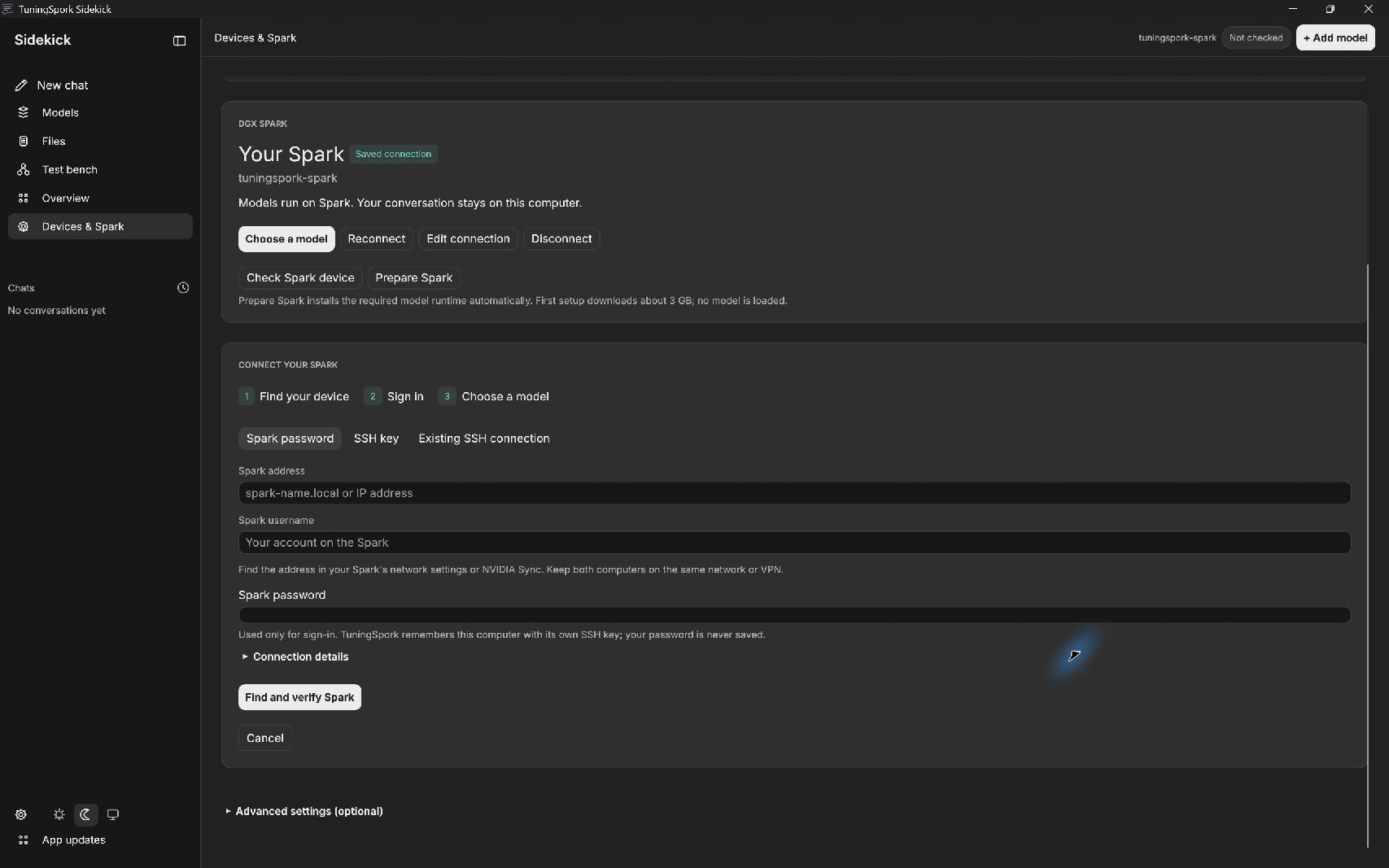
TuningSpork Sidekick 0.1.17 development preview: guided SSH sign-in, automatic folders, and connection controls.
About this app
Windows 0.1.43 makes setup and in-app updates reliable when unrelated programs such as terminal windows are open, and keeps updates working when the Marketplace revises its review policy, with the same security checks. It keeps everything in 0.1.42: longer chats that summarize older turns while preserving the full transcript, per-chat character and custom instructions, and automatic answer length. Studio and Sidekick share a searchable model library with device, source, model type, task and runtime-state filters, result counts, reset and sorting. Downloaded models are distinguished from the exact currently connected chat model; library inventory checks remain quiet and do not imply GPU readiness. The shared model surface offers Chat models and Speech models, with clear transcription and speaking roles and readable names for trained voices. Sidekick keeps dictation separate from an explicitly started voice conversation. Choose the local microphone and speaking voice; built-in Whisper handles transcription, with overrides in advanced settings, review the recognized text, and use spoken replies without a paid inference API. Voice sessions show recording, mute and end controls, stop after configured silence, and rearm only within the enabled session. These controls do not establish voice likeness or model quality. Sidekick's chat screen puts the conversation first: a compact sidebar for chats, models and files, a quiet conversation header, a centered reading column and one composer with model, microphone, voice and permission controls. On that screen, secondary tools stay in a Tools menu, and a small download indicator opens retained transfer activity. Assistant answers retain formatted Markdown and inline source previews. The chat composer keeps a stable position while shared voice models are checked at startup. Overview cards share consistent heading, detail and action rows at the supported window widths. Studio and the other pages retain their existing appearance beyond these requested alignment fixes. Training activity keeps elapsed time and phase visible while the worker is alive; a percentage appears only when work has a known denominator. Voice controls and card layouts stay within their available space, and floating menus remain above page content. Sidekick offers an optional local agent mode for typed or locally transcribed requests. Access starts off; users explicitly select folders and optionally one Windows app, review the permission scope and enable the session. The selected local model can search permitted folders, read bounded text and propose new Markdown, text or Word (.docx) documents. Every document save shows its destination and authored text for confirmation and never silently overwrites an existing file. Word output supports headings and plain paragraphs. Saved documents retain an inline authored-source preview, including newly created Word documents; requested text/code previews and verified local PNG previews also appear in chat. Arbitrary existing DOCX and PDF binary contents cannot be read or rendered by the agent tools. Windows app tools inspect accessible controls and recheck the selected process and observation before clicking or replacing editable text. App actions require review by default; users can explicitly permit supported actions for the selected app during this session. Stop cancels the bounded loop and Revoke disables access. Unsupported controls fail without an arbitrary command, coordinate or clipboard fallback. Model planning ability and context limits affect task completion. No paid inference service is required. Studio and Sidekick share local speech models. Choose a microphone, record explicitly, stop or cancel, transcribe locally into editable text and play generated speech. Sidekick can read replies using the selected voice. Studio Voice lab prepares paired recordings and exact transcripts for genuine speech training, then supports listening comparisons on new phrases. Speech training changes voice and delivery; a conversation model chooses the words. Trained voices remain experimental until the user judges their quality. Speech uses an optional isolated runtime and downloaded models on the selected data volume, and runs on this computer. Model downloads have a dedicated activity view that remains available as you move between pages. It identifies the model and destination, shows transfer bytes and percentage when a total is known, and keeps completion or failure visible. Search and selection controls have larger type, padding and clearer labels. Busy searches, checks and model operations show visible activity indicators. Find a starting model in Studio or Sidekick, check its fit on this computer or a connected Spark, and choose what to do next. Search supported Hugging Face models and original publisher weights, with recommendations, device fit estimates and discovery labels for community models. Fine-tune supported safetensors models in Studio through Choose model, Add examples and Train & compare. The shared collection exposes Chat, Try decisions, Match data fields and Score a record. Downloads and checked Studio exports are visible in both tools; completed experimental Laya checkpoints can be inspected without pretending they passed quality approval. Local Ollama models are available for chat and are labeled chat-only; their quantized files are not fine-tuning inputs. Saved Spark connections are shared between Studio and Sidekick. Password sign-in provisions an app-owned SSH key for later passwordless reconnection; existing OpenSSH aliases and keys remain supported. Saved sign-ins show their key availability and can be refreshed, reconnected, edited or disconnected. Sidebar chat deletion uses a compact confirmation, removes the chat immediately, and retains Undo. Bring labeled data, adapt a supported model in Studio, compare it with its starting model, and use eligible models in Sidekick. Studio provides guided Qwen LoRA experiments, Laya metadata decisions and numeric XGBoost classification. Separate development, target and retention checks expose regressions; completing training does not approve a model. Sharing unlocks only when the supplied checks pass, and those checks do not establish accuracy on other data. Connect Spark guides users through finding or entering their machine, reviewing its SSH host key, and authenticating. Existing OpenSSH aliases and configured keys remain supported. The app finds the remote account's TuningSpork data location and existing runtime automatically; a network drive or manually selected remote mount folder is not required. Saved connections expose Edit and Disconnect in Studio and Sidekick. The Select model picker lists eligible local models and models on the connected Spark, with the device named on each card. Mount & chat loads the selected model on its device; it does not mount a filesystem or transfer model weights. Search by model name, base model or location, filter by device and model type, and sort names. Prompts, included history and retrieved document passages travel to the selected Spark for inference. Compatible metadata and numeric classifiers use their own workflows. Ordinary Chat does not give models shell commands or account access; separately enabled local agent tools use explicit permission scopes. Delete chat requires confirmation; Undo restores its retained local recovery copy. Windows x64 and DGX Spark Linux ARM64 have separate platform downloads under this single TuningSpork listing. Each download bundles Launcher, Studio and Sidekick. Windows setup offers component selection. The Spark AppImage opens Launcher and prepares the bundled per-user suite. Add a missing tool later from Launcher using the verified offline cache. Models, chats, datasets and settings live outside application release folders. App updates checks the DeloresAI accepted catalog. Install update downloads and verifies the approved suite artifact directly, closes the Windows suite automatically and preserves component selection and user data. Current platform availability and acceptance are established by each release receipt, not by this preparation document. This is an experimental preview. Earlier Qwen checks retained a critical error, and independently written Laya cases showed poor transfer; those candidates remained rejected. No model checkpoint is bundled and no general model-quality improvement is promised. Download or import an eligible model and supply suitable data. Models have separate licenses. NVIDIA hardware, a working driver and 64-bit CPython 3.12 are required for model computation on the selected device. Prepare runtime installs exact hash-locked dependencies into a fresh isolated environment only when requested. Initial runtime and optional model downloads need internet; prepared local workflows need no cloud AI service. Both desktop builds can run Studio jobs on a configured Spark over SSH. Remote jobs and chat require a compatible prepared runtime on that host. The native Spark target is ARM64 on Ubuntu 24.04-based DGX OS with NVIDIA GB10 and driver 580 or newer. Spark runtime preparation retains the known NVIDIA cuSPARSELt packaging diagnostic, verifies the original vendor bytes and independently checks CUDA calculations; other dependency errors stop setup. The platform minimum disk budget covers the application install and update, not optional ML runtimes or model checkpoints. Runtime preparation checks its destination, cache and temporary storage separately; models need additional capacity at their selected location. Starting from a downloaded language model selects the model fine-tuning workflow with a valid checkpoint metric; unsupported retained metrics are shown explicitly. The shared model library keeps a permanent 32px activity slot beside its filters, with the refresh or verification phase available on hover. Library and chat model chooser controls/cards keep their position through recurring inventory checks. The chat model chooser stacks its labeled selectors and bounds them to the drawer width so they remain readable without extending beneath the conversation. Sidekick retains draft and model-search focus while background status panels change. Studio Voice lab accepts several CSV or JSONL teaching files together with saved recordings; each file's relative audio paths resolve against that file. Explicit splits remain intact and cross-file duplicates or group leakage are rejected. Qwen language training and local replies use a consistent final-answer template; returned completions are graded unchanged. Speech training aligns both primary and residual codec targets without an extra causal shift. These corrections do not certify voice likeness, personality quality or checkpoint approval.
External services & costs
NVIDIA CUDA through isolated Python workers: No application subscription or developer credits. Hardware, storage and electricity are supplied by the user. 64-bit CPython 3.12 and the driver are prerequisites. PyPI and PyTorch package repositories: The fixed Windows wheel download set is 2,974,104,140 bytes; extraction and the installed runtime need additional disk space. No package-index dependency fallback or source builds are permitted. Hugging Face model downloads: Model-specific licenses, access conditions, storage and bandwidth apply. No checkpoint or paid model entitlement is included. User-controlled SSH compute: The user supplies the remote machine, compatible runtime and network access. TuningSpork does not provide a hosted training service. DeloresAI coordinated suite updates: A Marketplace account and internet are required. The suite remembers its protected desktop sign-in; no copied approval code is required for each update. No developer credits or application subscription. Ollama: Optional local service and model downloads; separate model licenses apply. Windows UI Automation: Uses the user's Windows apps and local model. No paid API or remote desktop service.
NVIDIA CUDA through isolated Python workers — Required
Model computation requires NVIDIA hardware, drivers and a compatible CPython 3.12/CUDA worker environment. Prepare runtime installs dependencies only when requested.
No application subscription or developer credits. Hardware, storage and electricity are supplied by the user. 64-bit CPython 3.12 and the driver are prerequisites.
PyPI and PyTorch package repositories — Optional
User-initiated runtime preparation installs 42 reviewed Windows CPython 3.12 wheels from exact official HTTPS URLs with required SHA-256 verification. An existing compatible runtime may be selected instead.
The fixed Windows wheel download set is 2,974,104,140 bytes; extraction and the installed runtime need additional disk space. No package-index dependency fallback or source builds are permitted.
Hugging Face model downloads — Optional
Download an explicitly selected supported base model; local compatible model files can be used instead.
Model-specific licenses, access conditions, storage and bandwidth apply. No checkpoint or paid model entitlement is included.
User-controlled SSH compute — Optional
Find or enter a Spark, review the SSH host key and authenticate, discover its existing TuningSpork environment, run selected jobs and use an explicitly mounted remote model. Existing OpenSSH aliases/key configuration remain supported.
The user supplies the remote machine, compatible runtime and network access. TuningSpork does not provide a hosted training service.
DeloresAI coordinated suite updates — Optional
Check the accepted platform catalog, directly download and verify the approved artifact, then install the suite after the user chooses Install update.
A Marketplace account and internet are required. The suite remembers its protected desktop sign-in; no copied approval code is required for each update. No developer credits or application subscription.
Ollama — Optional
Chat with user-selected local models through the running localhost Ollama service; quantized Ollama files are not fine-tuning inputs.
Optional local service and model downloads; separate model licenses apply.
Windows UI Automation — Optional
Opt-in selected-app control via native accessible controls, bound to the observed window and process lifetime; inaccessible canvas controls remain unsupported.
Uses the user's Windows apps and local model. No paid API or remote desktop service.
Privacy & permissions
Local training, local chat and local classifier inference do not automatically upload datasets, models or conversations. Selecting Studio SSH compute copies selected job data and workers to the configured host and retrieves results. Selecting a Spark chat model sends prompts, included conversation history and retrieved document passages to that host for inference; model files remain on their selected device. Model/runtime downloads contact their repositories. Update checks contact deloresai.com with normal request metadata and platform/app information. Updates download the exact approved artifact directly from the Marketplace using the saved Marketplace desktop session. Explicit sign-in sends credentials only to the official Marketplace authentication service; passwords are not saved. Sharing a .tspmodel file is a separate user action; reports may contain evaluation examples. Microphone recordings, local transcription and local speech generation stay on this computer; speech operations do not use the selected Spark target. Opt-in local agent file snippets and selected-app observations are supplied to the selected local model on this computer. App-control actions can change the chosen application; Sidekick does not claim that permission prevents model mistakes.
Filesystem: Read user-selected training and evaluation datasets, compatible model folders, imported packages and explicitly attached text documents, Read and write TuningSpork jobs, models, chats and retained deleted-chat recovery files, reports, settings and selected document indexes, Read and write the local Hugging Face model cache and an explicitly prepared isolated Python runtime, Read packaged workers; stage verified update artifacts and install per-user suite components and Launcher cache while preserving separate user data, Copy selected job/worker files to and from a configured SSH host; discover and verify remote model files and start app-owned inference workers there, On explicit Spark setup, create owner-restricted SSH identity/config files and append only the public key to remote authorized_keys; preserve unrelated SSH files and keys., Use the selected microphone only after Record; write local WAV clips/transcripts, retained teaching audio and speech checkpoints, and play selected local audio., With explicit consent: search/read selected folders; preview text/code/PNG; review/save new Markdown, text or Word files; control a selected Windows app. Existing DOCX/PDF contents are unsupported.. Network domains: pypi.org, files.pythonhosted.org, download.pytorch.org, download-r2.pytorch.org, huggingface.co, us.aws.cdn.hf.co, deloresai.com. No OS elevation declared.
All downloads
Choose the computer you’re downloading for. Other-platform downloads never install automatically.
Included in this download
One installer contains these apps. Choose optional apps during setup.
- TuningSpork LauncherAlways included
- TuningSpork StudioChoose during setup
- TuningSpork SidekickChoose during setup
Choose the operating system and processor of the destination computer. Downloads do not install automatically. This website does not inspect your device or check whether required hardware and runtimes are installed.
| Platform | Package | Size | Verification | Action |
|---|---|---|---|---|
| Windows x64Minimum OS: 10.0.26100Publisher-declared GPU: NVIDIA Ampere or newer, CUDA BF16 support, 16 GB VRAM, and Windows NVIDIA driver 572.61 or newer. Per-model capacity check required.Publisher-declared required runtime: 64-bit CPython 3.12 with venv and pipPublisher-declared required runtime: TuningSpork managed runtime: PyTorch 2.11.0+cu128 and pinned dependencies, installed through Prepare runtime | NSIS | 17.8 MB | Verified releaseOct 12, 2026Release checks | Sign in to download |
| Linux ARM64Minimum OS: 24.04Publisher-declared GPU: NVIDIA GB10 (DGX Spark), compute capability 12.1, driver 580 or newer. CUDA 13/BF16 runtime required; per-model capacity checks still apply.Publisher-declared required runtime: 64-bit CPython 3.12 with venv and pipPublisher-declared required runtime: TuningSpork isolated runtime: PyTorch 2.11.0+cu130 and 60 pinned wheels, installed through Prepare runtimePublisher-declared required runtime: Working desktop graphics session; AppImage FUSE support or AppImage extract-and-run capability | APPIMAGE | 22.7 MB | Verified releaseOct 10, 2026Release checks | Sign in to download |
Release checks Windows x64
Baseline release verification
Automated static checks inspected release and package identity, malware, dependency inventory, vulnerability advisories and potential secrets in supported files. Secret scanning skips native PE, ELF and Mach-O binaries. High and Critical dependency findings block admission; lower-severity advisories remain visible. Review individual results for actual coverage and expiry. Native lifecycle and full source-code security validation are not established by these checks.
Installer signing: Unsigned — this installer does not have a publisher signature.
- Minimum operating system
- 10.0.26100
- Minimum RAM
- 32 GB
- Recommended free space
- 1.5 GB plus space for application data and backups
- Publisher-declared GPU
- NVIDIA Ampere or newer, CUDA BF16 support, 16 GB VRAM, and Windows NVIDIA driver 572.61 or newer. Per-model capacity check required.
- Publisher-declared required runtimes
- 64-bit CPython 3.12 with venv and pip, TuningSpork managed runtime: PyTorch 2.11.0+cu128 and pinned dependencies, installed through Prepare runtime
These prerequisites are publisher declarations. This website does not inspect your device or verify that it meets them.
The package’s operating system and processor identity were checked. Installation compatibility and minimum system requirements have not been established by runtime testing.
- Installer file identityPassed
The exact GitHub release asset bytes, SHA-256 digest and size were checked.
- Package and architecturePassed
The nsis package and its x64 application payload were inspected without running the application.
- Publisher authorizationPassed
Current repository access, publisher ownership and free distribution authorization were verified.
- Source and release identityPassed
The GitHub release, declared channel, asset IDs and immutable source commit match this review.
- Malware scanPassed
897 files scanned; 0 infected files. Exact linked source snapshot and passively extracted installer; no application code executed.
- Dependency inventoryPassed
Inventoried 506 source dependencies and 35 packaged dependencies. Exact linked source snapshot and passively extracted installer; no application code executed.
- Dependency vulnerability assessmentPassed
High and critical vulnerabilities block publication. Dependency findings: 0 critical, 0 high, 3 medium, 0 low, 0 unknown, 0 info. High and critical findings block publication; lower severities are advisories. Exact linked source snapshot and passively extracted installer; no application code executed. 3 lower-severity or unrated advisories remain; the publisher receives the detailed findings.
- Secret patterns in supported filesPassed
Gitleaks checks recognizable credential patterns in supported source/extracted text and passively extracted CPython 3.12 literal constants. Native PE, ELF and Mach-O binaries are skipped. Constants are scanned separately; variable assignments, dynamically assembled values and program behavior are not reconstructed. This is not comprehensive bytecode analysis. 896 input files were supplied; the inspected-file count is not measured. 0 unreviewed potential embedded credentials remain from 0 original tool matches. Values are never included in reports.
- Publisher signingNot required
Trusted operating-system publisher signing was not established. This release policy permits that disclosed limitation.
- Installation and application behaviorNot run
Native installation, launch, update and uninstall testing has not run in this static review.
- Comprehensive source analysisNot run
Dependency and secret scans do not constitute comprehensive source-code or application behavior analysis.
- Reproducible build provenanceNot run
Source commit identity is checked; reproducing the binary from source is outside this review.
- Last successful scan
- Oct 12, 2026
- Rescan recommended after
- Oct 19, 2026
- Release approval
- Retained for this unchanged release
- Release policy
- 2026-09-10.release.1
- Download size
- 18,671,156 bytes
- SHA-256
a75c5792749982b7238f3eb38f99422d83193bb62e7f2224f04b15376bb1d2cb
Scan age and unavailable rescans do not remove this release’s approval. The original check dates remain visible; each download requires fresh authorization.
These checks apply to this exact file. They do not guarantee all future behavior. About release verification
Release checks Linux ARM64
Baseline release verification
Automated static checks inspected release and package identity, malware, dependency inventory, vulnerability advisories and potential secrets in supported files. Secret scanning skips native PE, ELF and Mach-O binaries. High and Critical dependency findings block admission; lower-severity advisories remain visible. Review individual results for actual coverage and expiry. Native lifecycle and full source-code security validation are not established by these checks.
Installer signing: Unsigned — this installer does not have a publisher signature.
- Minimum operating system
- 24.04
- Minimum RAM
- 64 GB
- Recommended free space
- 1.5 GB plus space for application data and backups
- Publisher-declared GPU
- NVIDIA GB10 (DGX Spark), compute capability 12.1, driver 580 or newer. CUDA 13/BF16 runtime required; per-model capacity checks still apply.
- Publisher-declared required runtimes
- 64-bit CPython 3.12 with venv and pip, TuningSpork isolated runtime: PyTorch 2.11.0+cu130 and 60 pinned wheels, installed through Prepare runtime, Working desktop graphics session; AppImage FUSE support or AppImage extract-and-run capability
These prerequisites are publisher declarations. This website does not inspect your device or verify that it meets them.
The package’s operating system and processor identity were checked. Installation compatibility and minimum system requirements have not been established by runtime testing.
- Installer file identityPassed
The exact GitHub release asset bytes, SHA-256 digest and size were checked.
- Package and architecturePassed
The appimage package and its arm64 application payload were inspected without running the application.
- Publisher authorizationPassed
Current repository access, publisher ownership and free distribution authorization were verified.
- Source and release identityPassed
The GitHub release, declared channel, asset IDs and immutable source commit match this review.
- Malware scanPassed
1191 files scanned; 0 infected files. Exact linked source snapshot and passively extracted installer; no application code executed.
- Dependency inventoryPassed
Inventoried 478 source dependencies and 24 packaged dependencies. Exact linked source snapshot and passively extracted installer; no application code executed.
- Dependency vulnerability assessmentPassed
High and critical vulnerabilities block publication. Dependency findings: 0 critical, 0 high, 3 medium, 0 low, 0 unknown, 0 info. High and critical findings block publication; lower severities are advisories. Exact linked source snapshot and passively extracted installer; no application code executed. 3 lower-severity or unrated advisories remain; the publisher receives the detailed findings.
- Secret patterns in supported filesPassed
Gitleaks checks recognizable credential patterns in supported source/extracted text and passively extracted CPython 3.12 literal constants. Native PE, ELF and Mach-O binaries are skipped. Constants are scanned separately; variable assignments, dynamically assembled values and program behavior are not reconstructed. This is not comprehensive bytecode analysis. 1193 input files were supplied; the inspected-file count is not measured. 0 unreviewed potential embedded credentials remain from 36 original tool matches. Values are never included in reports. 36 original high generic-api-key matches were retained as reviewed information after exact-file, position and matched-byte checks against the fixed upstream review registry. 36 lower-severity or unrated advisories remain; the publisher receives the detailed findings.
- Publisher signingNot required
Trusted operating-system publisher signing was not established. This release policy permits that disclosed limitation.
- Installation and application behaviorNot run
Native installation, launch, update and uninstall testing has not run in this static review.
- Comprehensive source analysisNot run
Dependency and secret scans do not constitute comprehensive source-code or application behavior analysis.
- Reproducible build provenanceNot run
Source commit identity is checked; reproducing the binary from source is outside this review.
- Last successful scan
- Oct 10, 2026
- Rescan recommended after
- Oct 17, 2026
- Release approval
- Retained for this unchanged release
- Release policy
- 2026-09-10.release.1
- Download size
- 23,792,136 bytes
- SHA-256
bc32e900d7d4835106b29b66718cc5f4c73c597365e73bdc5685a751ec50856a
Scan age and unavailable rescans do not remove this release’s approval. The original check dates remain visible; each download requires fresh authorization.
These checks apply to this exact file. They do not guarantee all future behavior. About release verification
BUILT WITH YOUR FEEDBACK
Community
Share what works, what needs fixing, and what should come next.
Loading the conversation…
to share feedback or give a thumbs up. Feedback is public.
PRIVATE WORKFLOW REPORTS
Report a problem with TuningSpork
Visible only to the person submitting the report and this app’s publisher team. Reports are never posted to public Community feedback.